Anytone AT-778UV Cheat Sheet
I got the Anytone AT-778UV as a mobile rig for the Ham Mobile. It’s a fine enough radio, but programming it is about as intuitive as … programming a Chinese radio! Ug, it’s the worst. Here’s how to save frequencies/repeaters.
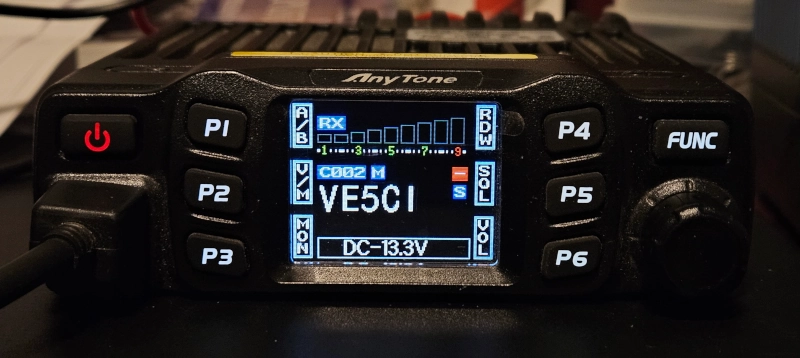
Default Main Screen Menu Setup
You swap these with a FUNC button quick tap. Change them in the menu.
| Main Setting A | |
|---|---|
| P1 A/B | P4 RDW |
| P2 V/M | P5 SQL |
| P3 MON | P6 VOL |
| Main Setting B | |
|---|---|
| P1 DIR | P4 POW |
| P2 SFT | P5 CDT |
| P3 SCN | P6 BND |
Repeater Programing Steps
Frequency and Offset
1) P2 V/M to Enter VFO Mode, push knob in to select
2) Using mic buttons, input the repeater frequency
3) FUNC quick tap to get to Main Setting B layout.
4) P2 is now SFT for Frequency Offset. Quick Press.
5) Enter the desired frequency shift on the mic buttons. Ex: 0.600MHz
6) Set the + or - by pressing P2 again.
7) Save this by pressing FUNC
Tones
1) FUNC quick press for Main Setting B layout.
2) P5 for CDT. Press this again for RCDT (Receive) or TCDT (Transmit).
3) Turn the knob to desired tone set Ex: CTC Press knob in to select
4) Turn knob to set the tone frequency Ex: 88.5
5) FUNC to lock in
Save The Settings
1) On Main Menu Layout A, press and hold P2 V/M. Little box will go red if that menu slot is already occupied with settings.
2) Rotate the knob until the little box is blue for an empty slot.
3) Press and hold P2 V/M again to save to that slot.
4) Quick press P2 to come out of VFO mode and enter memory mode.
Name the Repeater
1) Press F2 V/M & go into Channel Mode Press and hold FUNC.
2) Turn knob to 2 CHAN MENU and push knob in to select.
3) Rotate knob down to 11 NAME
4) Rotate knob to choose the character, press knob in to select.
5) P3 Back to go back to main menu when done.
Other Settings
Delete A Channel
In channel mode, hold down P2 V/M and FUNC for 2 Seconds.
Display Channel Names
Long Press FUNC > 1 FUNC MENU > 3 DSP > Select NM
73 de VE5REV